Free

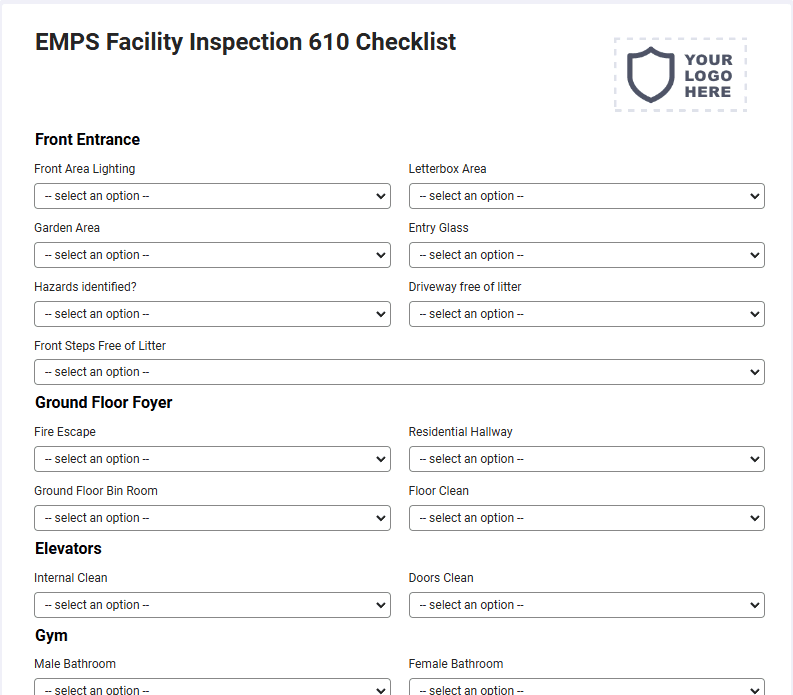
EMPS Facility Inspection 610 Checklist

EMPS Facility Inspection 610 Checklist

EMPS Facility Inspection 610 Checklist

Security, Service, Maintenance

The system enables an Exporter or Importer to use an online payment facility for making payments for purposes excluding fees for applications where an online payment facility coupled with an online application facility is already available. This is a mobile EMPS Facility Inspection 610 Checklist compatible with iOS and android mobile devices.

Please complete the qualifying fields on the next page to get full access to a copy of this form on your mobile phone, tablet or as a downloadable PDF.
Compatible with

How it works

1

Activate your form

Sign up to activate your form(s), add your logo and company information. You’re all set to go.

2

Fill out on your device

Download and sign in to the mobile app to fill out forms on the go from any tablet or mobile device.

3

Save & store anywhere

All your form submissions are stored in your secure account for you and your team access, share, or download.

Questions and answers

FAQs about Contractor’s Material and Test Certificate for Underground Piping Form - NFPA 25

Can I customize this EMPS Facility Inspection 610 Checklist?

Yes. Joyfill provides a drag-and-drop form builder to customize this EMPS Facility Inspection 610 Checklist to fit your brand and preferred layout. This includes: adding your logo, company information, remove fields, and much more.

Can I customize this EMPS Facility Inspection 610 Checklist?

Yes. Joyfill provides a drag-and-drop form builder to customize this EMPS Facility Inspection 610 Checklist to fit your brand and preferred layout. This includes: adding your logo, company information, remove fields, and much more.

Is this EMPS Facility Inspection 610 Checklist mobile-friendly?

Yes. All forms are mobile optimized and fillable from any mobile or tablet devices. Just activate this EMPS Facility Inspection 610 Checklist, then download the Joyfill mobile from the Apple App Store or Google Play Store. Your newly active form will be waiting for you there. You can also active additional forms from the form library inside.

Is this EMPS Facility Inspection 610 Checklist mobile-friendly?

Yes. All forms are mobile optimized and fillable from any mobile or tablet devices. Just activate this EMPS Facility Inspection 610 Checklist, then download the Joyfill mobile from the Apple App Store or Google Play Store. Your newly active form will be waiting for you there. You can also active additional forms from the form library inside.

Where are my form submissions stored online?

When you first active the EMPS Facility Inspection 610 Checklist, Joyfill requires you to create a free account. This account is where all your forms and submissions are stored for you to access at anytime from the cloud on any device.

Where are my form submissions stored online?

When you first active the EMPS Facility Inspection 610 Checklist, Joyfill requires you to create a free account. This account is where all your forms and submissions are stored for you to access at anytime from the cloud on any device.

Can I fill out the EMPS Facility Inspection 610 Checklist online?

Yes. All form submissions are stored online in the secure Joyfill cloud by default. You can login to access or download a local copy of records at anytime.

Can I fill out the EMPS Facility Inspection 610 Checklist online?

Yes. All form submissions are stored online in the secure Joyfill cloud by default. You can login to access or download a local copy of records at anytime.

Can I fill out the EMPS Facility Inspection 610 Checklist offline?

Yes. You can complete this EMPS Facility Inspection 610 Checklist from the Joyfill mobile app even without an internet connection. Your entries save on your device and can be sync'd to your account once you're back online.

Can I fill out the EMPS Facility Inspection 610 Checklist offline?

Yes. You can complete this EMPS Facility Inspection 610 Checklist from the Joyfill mobile app even without an internet connection. Your entries save on your device and can be sync'd to your account once you're back online.

Can I download this EMPS Facility Inspection 610 Checklist as a PDF file?

Yes. All filled out forms can be downloaded as a PDF file for you to store offline or in another cloud service, including: dropbox, Google Drive, OneDrive, etc,.

Can I download this EMPS Facility Inspection 610 Checklist as a PDF file?

Yes. All filled out forms can be downloaded as a PDF file for you to store offline or in another cloud service, including: dropbox, Google Drive, OneDrive, etc,.

Is it free to fill out this EMPS Facility Inspection 610 Checklist?

Yes. You can use Joyfill to fill out forms and documents for free, forever, up to a set number of submissions each month. If you hit the limit, upgrade your account to unlock more, or just wait until next month. No obligation.

Is it free to fill out this EMPS Facility Inspection 610 Checklist?

Yes. You can use Joyfill to fill out forms and documents for free, forever, up to a set number of submissions each month. If you hit the limit, upgrade your account to unlock more, or just wait until next month. No obligation.

Can I print this EMPS Facility Inspection 610 Checklist?

Yes. You can print a blank copy of this EMPS Facility Inspection 610 Checklist to fill out by hand, or complete it digitally first and print the finished record. Printed and PDF versions keep the same layout, so your on-site copy matches what's stored in the cloud.

Can I print this EMPS Facility Inspection 610 Checklist?

Yes. You can print a blank copy of this EMPS Facility Inspection 610 Checklist to fill out by hand, or complete it digitally first and print the finished record. Printed and PDF versions keep the same layout, so your on-site copy matches what's stored in the cloud.

Can my whole team use this EMPS Facility Inspection 610 Checklist?

Yes. Once you activate this EMPS Facility Inspection 610 Checklist, your team can access and fill it out from their own devices under your account. Every submission is stored in one place, so team members are always collaborating from the same records.

Can my whole team use this EMPS Facility Inspection 610 Checklist?

Yes. Once you activate this EMPS Facility Inspection 610 Checklist, your team can access and fill it out from their own devices under your account. Every submission is stored in one place, so team members are always collaborating from the same records.

More about EMPS Facility Inspection 610 Checklist

More about EMPS Facility Inspection 610 Checklist

The EMPS Facility Inspection 610 Checklist is designed to streamline the inspection and auditing processes related to export and import activities, specifically when utilizing an online payment system. This checklist is particularly useful for Exporters and Importers who need to ensure that their online payment facilities are functioning correctly and comply with relevant regulations. It helps verify that payments for services or goods, excluding application fees where an online payment and application system already exists, are processed efficiently and securely. The checklist allows users to confirm that the payment system integrates seamlessly with their operational processes, ensuring that there are no issues with financial transactions. With its compatibility across both iOS and Android mobile devices, the EMPS Facility Inspection 610 Checklist provides a convenient, mobile-first solution for real-time inspections and audits. This accessibility allows inspectors to complete evaluations directly from their mobile devices, making it easier to conduct thorough assessments without the need for paperwork or additional equipment. During the inspection, users can check key factors such as payment processing accuracy, system integration, security protocols, and compliance with relevant industry standards. By using this digital checklist, inspectors can record their findings quickly, generate reports, and provide immediate feedback or corrective actions when needed. The digital format of the EMPS Facility Inspection 610 Checklist also enhances efficiency by enabling inspectors to add notes, take photos, and flag any potential issues directly within the application. This functionality ensures that critical details are documented in real-time, improving accuracy and accountability. With the ability to manage multiple inspections and keep track of ongoing compliance, the checklist empowers Exporters, Importers, and their teams to maintain smooth and secure financial transactions throughout their supply chains.

Forms related to the EMPS Facility Inspection 610 Checklist

Forms related to the EMPS Facility Inspection 610 Checklist

Get started - It's free forever!

Join thousands of field teams already saving hours on every job.

Free forever

No credit card required

Cancel anytime

Support included

Get started - It's free forever!

Join thousands of field teams already saving hours on every job.

Free forever

No credit card required

Cancel anytime

Support included

Get started - It's free forever!

Join thousands of field teams already saving hours on every job.

Free forever

No credit card required

Cancel anytime

Support included